Running iroh on an ESP32
by Rüdiger KlaehnRunning iroh on embedded systems
Iroh works very well on modern hardware of various sizes, from smartphones to big multicore servers. But what if you want to use it in an embedded context?
I have a little hobby project for home automation. Naturally I thought about putting iroh on it.
Of course it would be easy to just get a Raspberry Pi and put iroh on it. But that would double the cost of the project and also not be very elegant.
So let's instead try to get iroh to work on some really cheap embedded device, an ESP32. More specifically an Espressif ESP32 WROVER chip that is the part of many cheap ESP32 dev kits.
You might think that it is impossible to get a complete QUIC stack including TLS to run on such a small device. But on the other hand, this CPU is about as powerful as the first 32 bit computer I owned, an AMD 386DX40 with 4 MiB of RAM. Back in 1992 this was considered a very powerful computer. It even ran DOOM.
Surely it should be possible to run iroh on that...
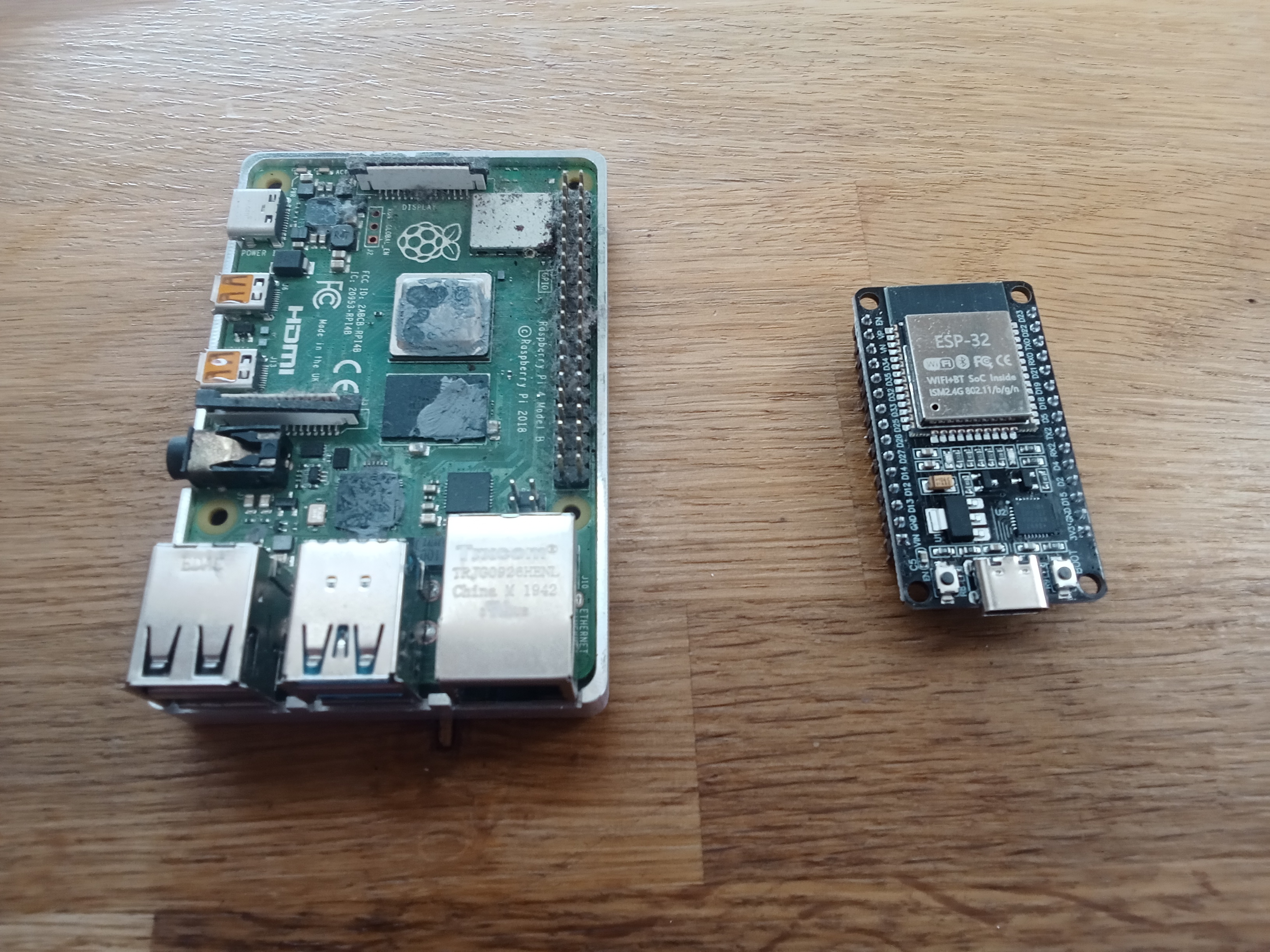
While just a bare Pi4 is about 100 EUR, you get an entire ESP32 dev kit including camera, sensors, actuators, breadboard and extension board for less than half.
Of course the ESP32 is a very limited environment compared to even the smallest Raspberry Pi. You get around 4MiB of flash for the application binary and ~500 KiB of internal RAM. For some variants, like the one we are working with, you get some additional memory.
So it is going to be a tight fit.
Getting started
Using rust on an ESP32 is very well documented. There is an entire book for it.
We are not going to spend too much time with the main point of an ESP32, input and output via GPIO ports. We just want to set up a tiny hello world project and then turn it into an iroh hello world project.
To set up a simple hello world project, there is a project template.
This will give you a rust project that uses a proper operating system (FreeRTOS). This is required since iroh needs std and TCP/IP and WiFi support.
For minimal projects that don't need WiFi you can even run on bare metal. I have used this successfully for smaller projects.
❯ cargo generate esp-rs/esp-idf-template cargo
⚠️   Favorite `esp-rs/esp-idf-template` not found in config, using it as a git repository: https://github.com/esp-rs/esp-idf-template.git
🤷   Project Name: esp32-blog-post
🔧   Destination: /Users/rklaehn/projects_git/esp32-blog-post ...
🔧   project-name: esp32-blog-post ...
🔧   Generating template ...
✔ 🤷   Which MCU to target? · esp32
✔ 🤷   Configure advanced template options? · false
[ 1/13]   Done: .cargo/config.toml
...
🔧   Initializing a fresh Git repository
✨   Done! New project created esp32-blog-post
We now have a minimal hello world project with the ESP32 tool chain set up, and can run it.
Building this for the first time will download a custom toolchain. Some variants of the ESP32 use a RISC-V architecture, which does not require a custom toolchain.
Running it will try to flash it on a connected device, so you need an ESP32 connected to your development machine via USB-C Sometimes it does not find the device: unplugging and plugging in often helps.
❯ cargo run
    Finished `dev` profile [optimized + debuginfo] target(s) in 0.29s
     Running `espflash flash --monitor target/xtensa-esp32-espidf/debug/esp32-blog-post`
[2026-03-05T11:30:52Z INFO ] Serial port: '/dev/cu.usbserial-210'
[2026-03-05T11:30:52Z INFO ] Connecting...
[2026-03-05T11:30:58Z INFO ] Using flash stub
Chip type:         esp32 (revision v3.1)
Crystal frequency: 40 MHz
Flash size:        4MB
Features:          WiFi, BT, Dual Core, 240MHz, VRef calibration in efuse, Coding Scheme None
MAC address:       00:70:07:19:c8:4c
App/part. size:    574,272/4,128,768 bytes, 13.91%
[00:00:00] [========================================]      17/17      0x1000   Skipped! (checksum matches)                                                                   [00:00:00] [========================================]       1/1       0x8000   Skipped! (checksum matches)                                                                   [00:00:29] [========================================]     268/268     0x10000  Verifying... OK!                                                                              [2026-03-05T11:31:29Z INFO ] Flashing has completed!
Commands:
    CTRL+R    Reset chip
    CTRL+C    Exit

ets Jul 29 2019 12:21:46

rst:0x1 (POWERON_RESET),boot:0x1b (SPI_FAST_FLASH_BOOT)
configsip: 0, SPIWP:0xee
clk_drv:0x00,q_drv:0x00,d_drv:0x00,cs0_drv:0x00,hd_drv:0x00,wp_drv:0x00
mode:DIO, clock div:2
load:0x3fff0030,len:6384
load:0x40078000,len:15916
load:0x40080400,len:3920
entry 0x40080644
I (27) boot: ESP-IDF v5.5.1-838-gd66ebb86d2e 2nd stage bootloader
I (27) boot: compile time Nov 26 2025 10:51:37
I (28) boot: Multicore bootloader
I (30) boot: chip revision: v3.1
I (33) boot.esp32: SPI Speed      : 40MHz
I (37) boot.esp32: SPI Mode       : DIO
I (40) boot.esp32: SPI Flash Size : 4MB
I (44) boot: Enabling RNG early entropy source...
I (48) boot: Partition Table:
I (51) boot: ## Label            Usage          Type ST Offset   Length
I (57) boot:  0 nvs              WiFi data        01 02 00009000 00006000
I (64) boot:  1 phy_init         RF data          01 01 0000f000 00001000
I (70) boot:  2 factory          factory app      00 00 00010000 003f0000
I (77) boot: End of partition table
I (80) esp_image: segment 0: paddr=00010020 vaddr=3f400020 size=2b068h (176232) map
I (148) esp_image: segment 1: paddr=0003b090 vaddr=3ffb0000 size=0279ch ( 10140) load
I (152) esp_image: segment 2: paddr=0003d834 vaddr=40080000 size=027e4h ( 10212) load
I (156) esp_image: segment 3: paddr=00040020 vaddr=400d0020 size=531f8h (340472) map
I (276) esp_image: segment 4: paddr=00093220 vaddr=400827e4 size=090f4h ( 37108) load
I (296) boot: Loaded app from partition at offset 0x10000
I (296) boot: Disabling RNG early entropy source...
I (306) cpu_start: Multicore app
I (315) cpu_start: Pro cpu start user code
I (315) cpu_start: cpu freq: 160000000 Hz
I (315) app_init: Application information:
I (318) app_init: Project name:     libespidf
I (323) app_init: App version:      1
I (327) app_init: Compile time:     Mar  5 2026 13:29:50
I (333) app_init: ELF file SHA256:  000000000...
I (338) app_init: ESP-IDF:          v5.3.3
I (343) efuse_init: Min chip rev:     v0.0
I (348) efuse_init: Max chip rev:     v3.99
I (353) efuse_init: Chip rev:         v3.1
I (358) heap_init: Initializing. RAM available for dynamic allocation:
I (365) heap_init: At 3FFAE6E0 len 00001920 (6 KiB): DRAM
I (371) heap_init: At 3FFB30D0 len 0002CF30 (179 KiB): DRAM
I (377) heap_init: At 3FFE0440 len 00003AE0 (14 KiB): D/IRAM
I (384) heap_init: At 3FFE4350 len 0001BCB0 (111 KiB): D/IRAM
I (390) heap_init: At 4008B8D8 len 00014728 (81 KiB): IRAM
I (398) spi_flash: detected chip: generic
I (401) spi_flash: flash io: dio
W (405) pcnt(legacy): legacy driver is deprecated, please migrate to `driver/pulse_cnt.h`
W (414) i2c: This driver is an old driver, please migrate your application code to adapt `driver/i2c_master.h`
W (424) timer_group: legacy driver is deprecated, please migrate to `driver/gptimer.h`
I (434) main_task: Started on CPU0
I (444) main_task: Calling app_main()
I (444) esp32_blog_post: Hello, world!
I (444) main_task: Returned from app_main()
If we just do the naive thing and cargo add iroh, we get a lot of compile errors. It turns out that while the ESP32 platform espidf is an unix, it does not support some advanced features like cmsg. Several symbols in the ESP32 specific libc are just not there. Also, many 32 bit architectures used for embedded devices don't have 64 bit atomic support.
We will make sure to support ESP32 from iroh main in the future, but for now you will have to use a special branch of iroh.
This branch of iroh is using a branch of our QUIC implementation noq, as well as various other changes.
It exists just for this experiment and won't be updated.
Now let's do a minimal iroh endpoint setup and see what happens. An ESP32 is an incredibly constrained environment. Every thread requires its own stack, so we will manually set up a single threaded tokio runtime instead of using async fn main().
There is some setup needed before the runtime can even start, so using tokio::main is not an option even if you configure a single threaded runtime.
Inside the runtime, we will just create an endpoint.
    let rt = tokio::runtime::Builder::new_current_thread()
        .enable_time()
        .build()
        .expect("Failed to create tokio runtime");

    rt.block_on(async {
        let endpoint = iroh::Endpoint::builder()
            .bind()
            .await
            .expect("unable to bind endpoint");
        info!("Hello, iroh!");
    });
Missing symbols
When we compile this, we get a linker error. ESP32 does not provide a symbol that one of the iroh dependencies needs.
undefined reference to `gethostname'
We don't care that much about the hostname, so we can just define a noop implementation:
// ESP-IDF doesn't provide gethostname, but resolv_conf (via hickory-resolver) references it.
#[no_mangle]
unsafe extern "C" fn gethostname(name: *mut core::ffi::c_char, len: usize) -> core::ffi::c_int {
    if len > 0 && !name.is_null() {
        unsafe { *name = 0; }
    }
    0
}
Once we do that, compilation proceeds a bit further. We get to linking. But the troubles don't stop.
Binary size issues
region `iram0_2_seg' overflowed by 168642 bytes
Our binary is too large even in release mode to fit on the ESP32. But not by much. So we can just enable link time optimizations for release builds to get below the limit in Cargo.toml. While we are at it, we also optimize for size.
Unfortunately this will lead to even longer build times than normal release builds. But there is nothing we can do about it, and in any case flashing is even slower.
[profile.release]
opt-level = "z"
lto = true
codegen-units = 1
Binary size is a constant issue during development for small embedded devices. There are various ways in the iroh branch we are using to reduce code size and dependencies to solve this problem.
After enabling lto, we finally get to flash the program on the ESP32, which takes a while. We are almost at the size limit (88.53%).
Once flashing is complete we are greeted with a runtime error:
> cargo run --release

[2026-03-05T14:14:04Z INFO ] Serial port: '/dev/cu.usbserial-210'
[2026-03-05T14:14:04Z INFO ] Connecting...
[2026-03-05T14:14:10Z INFO ] Using flash stub
Chip type:         esp32 (revision v3.1)
Crystal frequency: 40 MHz
Flash size:        4MB
Features:          WiFi, BT, Dual Core, 240MHz, VRef calibration in efuse, Coding Scheme None
MAC address:       00:70:07:19:c8:4c
App/part. size:    3,655,104/4,128,768 bytes, 88.53%
[00:00:00] [========================================]      17/17      0x1000   Skipped! (checksum matches)                                                                                                                                          [00:00:00] [========================================]       1/1       0x8000   Skipped! (checksum matches)                                                                                                                                          [00:03:44] [========================================]    2051/2051    0x10000  Verifying... OK!                                                                                                                                                     [2026-03-05T14:17:56Z INFO ] Flashing has completed!

...
thread 'main' (1) panicked at src/main.rs:30:10:
Failed to create tokio runtime: Os { code: 13, kind: PermissionDenied, message: "Permission denied" }
note: run with `RUST_BACKTRACE=1` environment variable to display a backtrace

abort() was called at PC 0x40350e8e on core 0
0x40350e8e - std::sys::pal::unix::abort_internal
    at ??:??
What is it this time? Asking your favourite coding LLM reveals that we need to register an eventfd VFS, which is used by the tokio runtime.
// Register eventfd VFS — needed by mio's poll implementation which powers tokio I/O
let eventfd_config = esp_idf_svc::sys::esp_vfs_eventfd_config_t {
    max_fds: 5,
    ..Default::default()
};
unsafe { esp_idf_svc::sys::esp_vfs_eventfd_register(&eventfd_config) };
During the development process you will need to flash for every change. For some newer variants of the esp32 you can set a higher baud rate than default to drastically speed up the flash speed.
ESPFLASH_BAUD=2000000 cargo run --release
Memory
After flashing this change, we get a little bit further. This time we have a problem with malloc failing. Guru Meditation Error? Somebody likes Amiga it seems...
Guru Meditation Error: Core  0 panic'ed (LoadProhibited). Exception was unhandled.

Core  0 register dump:
PC      : 0x400897b9  PS      : 0x00060733  A0      : 0x800892c0  A1      : 0x3ffb6410
0x400897b9 - tlsf_malloc
    at ??:??
The default configuration uses only the internal memory of the ESP32. But that is very little. You can see a list of memory ranges during startup:
I (1413) heap_init: Initializing. RAM available for dynamic allocation:
I (1420) heap_init: At 3FFAE6E0 len 00001920 (6 KiB): DRAM
I (1426) heap_init: At 3FFB8178 len 00027E88 (159 KiB): DRAM
I (1432) heap_init: At 3FFE0440 len 00003AE0 (14 KiB): D/IRAM
I (1439) heap_init: At 3FFE4350 len 0001BCB0 (111 KiB): D/IRAM
I (1445) heap_init: At 4008B934 len 000146CC (81 KiB): IRAM
While it would be a fun challenge to try to get iroh to work with only internal memory, for now we will just use the external memory. While we're at it we will also increase the stack size.
sdkconfig.defaults:
CONFIG_ESP_MAIN_TASK_STACK_SIZE=98304

# Enable external PSRAM
CONFIG_SPIRAM=y
CONFIG_SPIRAM_USE_MALLOC=y
CONFIG_SPIRAM_MALLOC_ALWAYSINTERNAL=0
CONFIG_SPIRAM_MALLOC_RESERVE_INTERNAL=0
We have configured all dynamic allocation to use the external SPIRAM, and this has allowed us to increase the stack size generously.
Enabling external memory makes our memory problems go away for now:
I (2368) esp_psram: Adding pool of 4096K of PSRAM memory to heap allocator
Crypto provider
After all these rather tedious problems, we finally get to something interesting. The tokio runtime starts, and even the iroh endpoint init runs.
Now we get the following error:
thread 'main' (1) panicked at /Users/rklaehn/.cargo/git/checkouts/iroh-a3a56ab68883433d/e96d7b4/iroh/src/tls/resolver.rs:33:14:
no default crypto provider installed
note: run with `RUST_BACKTRACE=1` environment variable to display a backtrace

abort() was called at PC 0x40350e7a on core 0
0x40350e7a - std::sys::pal::unix::abort_internal
    at ??:??
Published iroh by default uses ring as the crypto provider. But ring is a C dependency with lots of platform-specific assembly code, which does not work on ESP32.
There is an alternative crypto provider aws-lc-rs, but it has the same problem — it wraps AWS-LC, a C library with platform-specific assembly that does not support the Xtensa architecture.
So what do we do? Rustls provides pluggable crypto providers, and the latest version of iroh makes sure to always use the configured provider.
So now we would have two options. Implement a rust only crypto provider, or implement a crypto provider that uses the ESP32 built in hardware acceleration.
The latter would be the right thing to do for a production system, but for now we are going to just do a pure rust version.
Since we are already very close to the binary size limit, we will only implement the absolute minimum number of cryptographic primitives that we need for iroh to work, and even take some shortcuts.
There is a crate rustls-rustcrypto that provides glue between rustls and rustcrypto. Due to binary size issues we had to fork it and feature gate the various implemented algorithms. For iroh itself we only need TLS13_AES_128_GCM_SHA256 and X25519.
We had to disable RSA to have any chance to get this to fit on the 4 MiB, and then disable certificate verification for the relay connection.
Now all that is needed is to add some glue code to make the crypto providers work with QUIC, and configure the global crypto provider.
    // Install pure-Rust crypto provider with QUIC support
    quic_crypto_provider::provider()
        .install_default()
        .expect("Failed to install rustls crypto provider");
WiFi
After all this ceremony, we get a bit further.
assert failed: tcpip_send_msg_wait_sem /IDF/components/lwip/lwip/src/api/tcpip.c:449 (Invalid mbox)
So we have the problem that TCP/IP does not work. But how is it supposed to work anyway? The ESP32 does not have a wired network card. What it does have is WiFi.
We need to set up WiFi, and also connect to an access point. This is an embedded project, so we are going to include the WiFi credentials into the binary. We don't want to hardcode them in the repo, so we configure them using an environment variable WIFI_CONFIG that is set at compile time.
While we are at it, we will also make sure the system time is set so certificates we use have somewhat correct times. ESP32 has built in SNTP support that we just need to enable.
Normal iroh stuff
At this point the endpoint setup works. Now all that remains to be done is to add a simple echo protocol and an accept loop.
Also we will use a compile time environment variable IROH_SECRET to allow configuring the endpoint id.
We also have the endpoint print a short and long ticket on the debug output, so we can try dialing it either using an ip address or address lookup.
I (7567) esp32_blog_post: Iroh endpoint bound
I (7567) esp32_blog_post:   Listening on: 192.168.0.186:62781
I (7567) esp32_blog_post:   Endpoint ID: 88096ffd6d3048ad7c1050645ae5b8fbf731963d892abe282736a7fbabd8f212
I (7587) esp32_blog_post:   Short ticket: endpointaceas375nuyerll4cbigiwxfxd57ommwhwesvprie43kp65l3dzbeaa
I (7597) esp32_blog_post:   Long ticket:  endpointaceas375nuyerll4cbigiwxfxd57ommwhwesvprie43kp65l3dzbeaibadakqaf2xxvag
I (7607) esp32_blog_post: Router started, accepting connections
To test this, we have a client in the repo for this blog post that uses published iroh from crates.io.
esp32-blog-post/client on main is 📦 v0.1.0 via 🦀 v1.93.1 took 12s
❯ cargo run endpointaceas375nuyerll4cbigiwxfxd57ommwhwesvprie43kp65l3dzbeaa
Connecting to ESP32...
Connected!
Sent: Hello from iroh (crates.io)!
Received: Hello from iroh (crates.io)!
Echo OK — crates.io iroh <-> ESP32!
And that's it! We got a complete iroh endpoint running on a tiny device, that we can talk to from any iroh endpoint.
Next steps
For my home automation project, the next step is to finally wire up some sensors and actuators. I am using two DHT22 temperature and humidity sensors for the sensor part, a LED display, and a solid state relay to switch a 220V load.
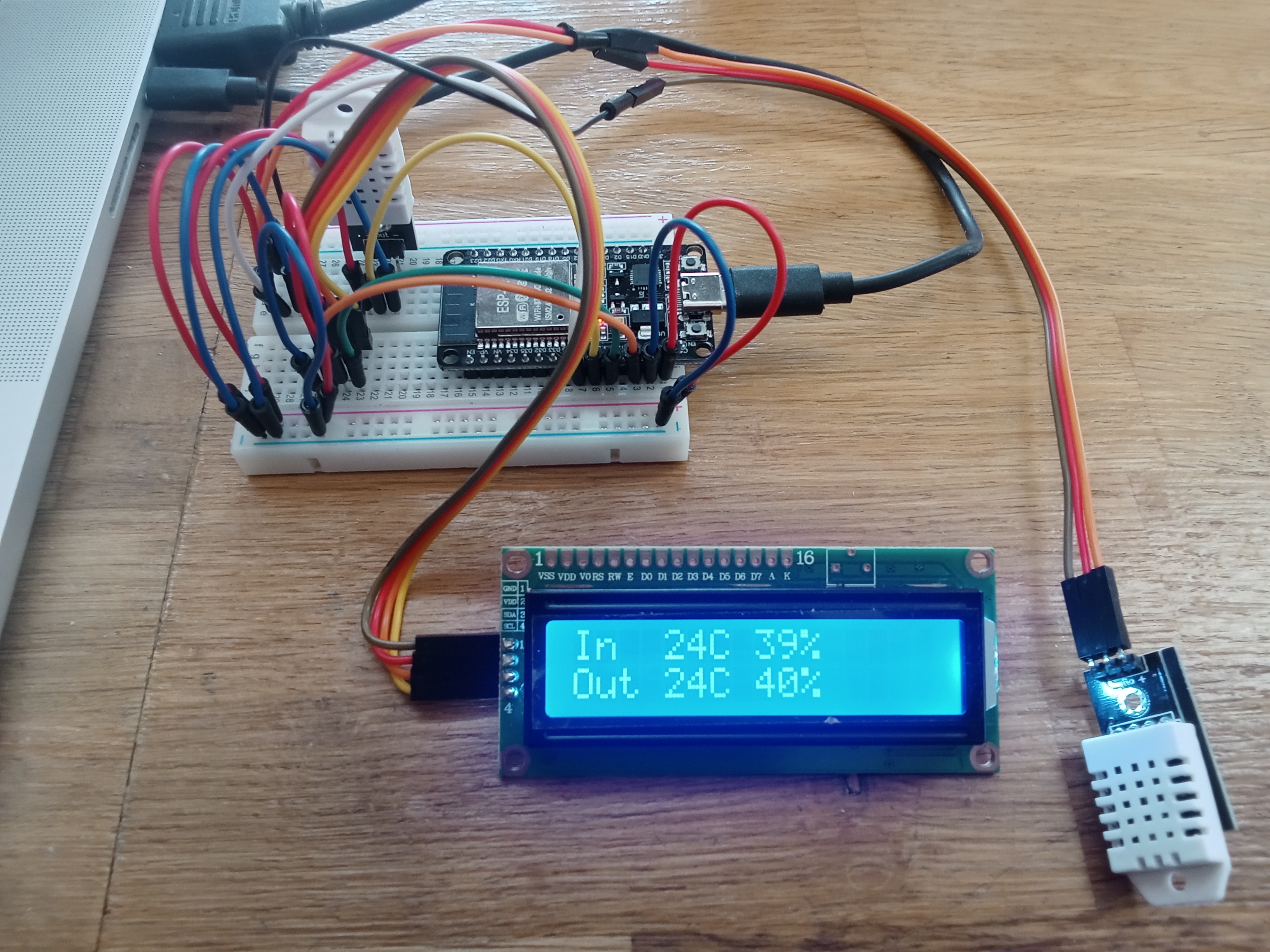
This is where the ESP32 shines: you can wire up all kinds of sensors and actuators in minutes to the numerous GPIO ports. For example you can drive most servos directly from the ESP32, which has built in PWM support.
And ESP32 boards are cheap and small enough that you can fit a complete project in a tiny box.
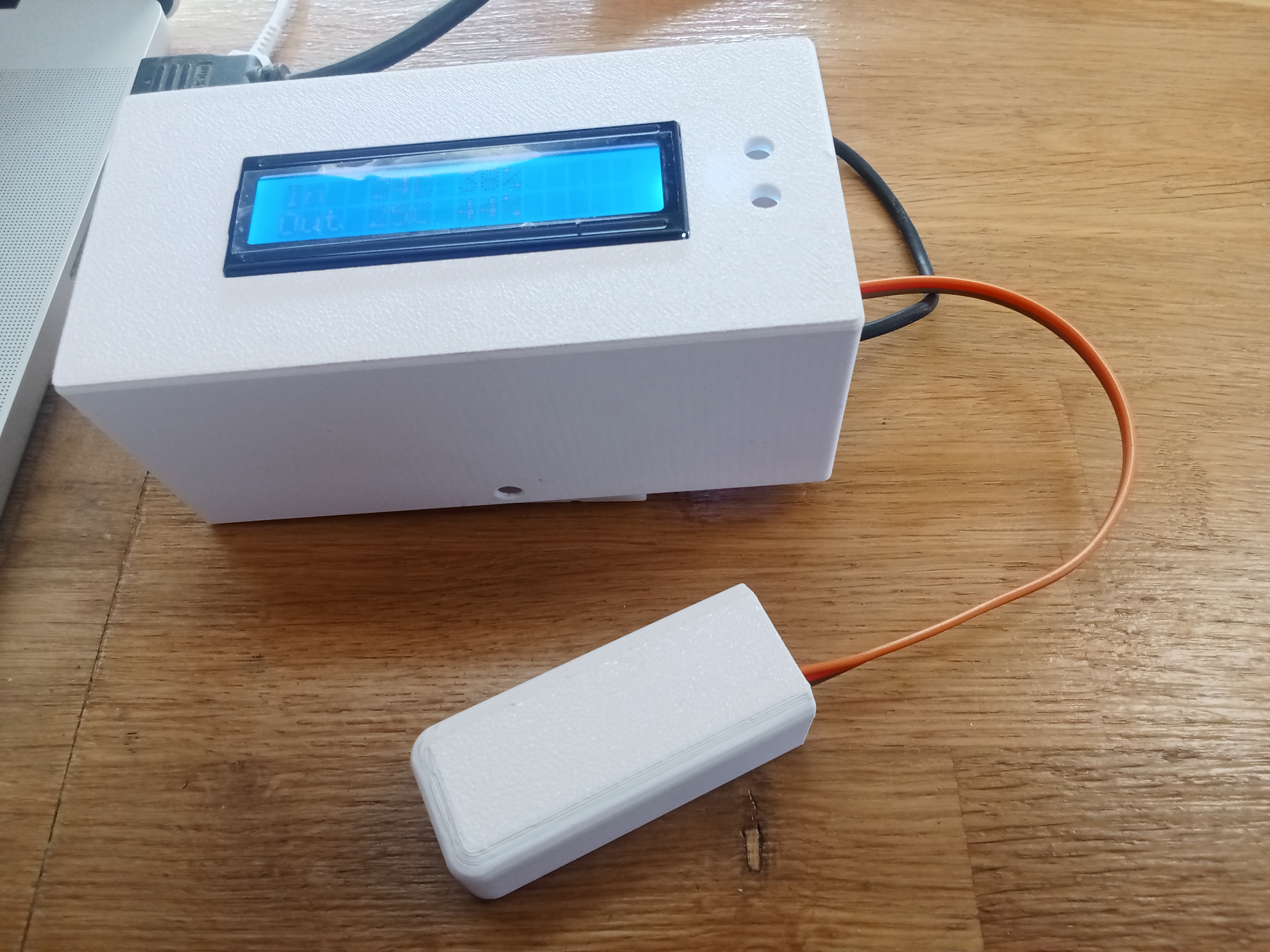
For the iroh project, this experiment revealed a number of places where we can reduce dependencies, several of which already made it to iroh main. We will make sure that iroh main compiles on 32 bit embedded architectures, and that expensive dependencies are optional.
In this project we succeeded in running iroh on an ESP32 with just 4 MiB of flash and 4 MiB of SPIRAM. But more powerful variants are also available and cheap, if you need some heavy non-iroh dependencies or memory for e.g. image processing.
Trying it out
For a hobby project I would suggest getting one of the more powerful variants. Playing with sensors is fun, waiting for lto compilation for every build is not.
The project for this blog post is https://github.com/n0-computer/iroh-esp32-example. It uses a patched version of iroh and its dependencies that works for this example. We will gradually add stable embedded systems support to iroh.
If you have a special requirement for a commercial project, talk to us.
To get started, take a look at our docs, dive directly into the code, or chat with us in our discord channel.